
LT2 E.coli Sample Submission Guide
Excel Reporting
This page outlines how to report routine E.coli samples collected from surface water or GWUDISW sources for LT2 (Long Term 2 Enhanced Surface Water Treatment Rule). The guidance is separated into three sections to match the sections in the CMDP Excel template: Sample Information, Microbial Results, and Field Results and Measurements (this section is not used for LT2 E.coli reporting). Additionally, this page includes a link to the Methods Chart and examples of completed sample submissions.
This guidance page notes the state/federally required fields within each section. Submit the information as described to help ensure a successful sample submission. Do not rely on the symbols noted on the template, as they do not include the state required fields.
Fields with one asterisk (*) are required to meet federal and state reporting requirements. Fields with two asterisks (**) are conditionally or situationally required. The remaining fields are not required for a successful data submission. Samples will be rejected if required fields are left blank.
If you have questions, please contact DEC CMDP support staff at dec.cmdpsupport@alaska.gov.
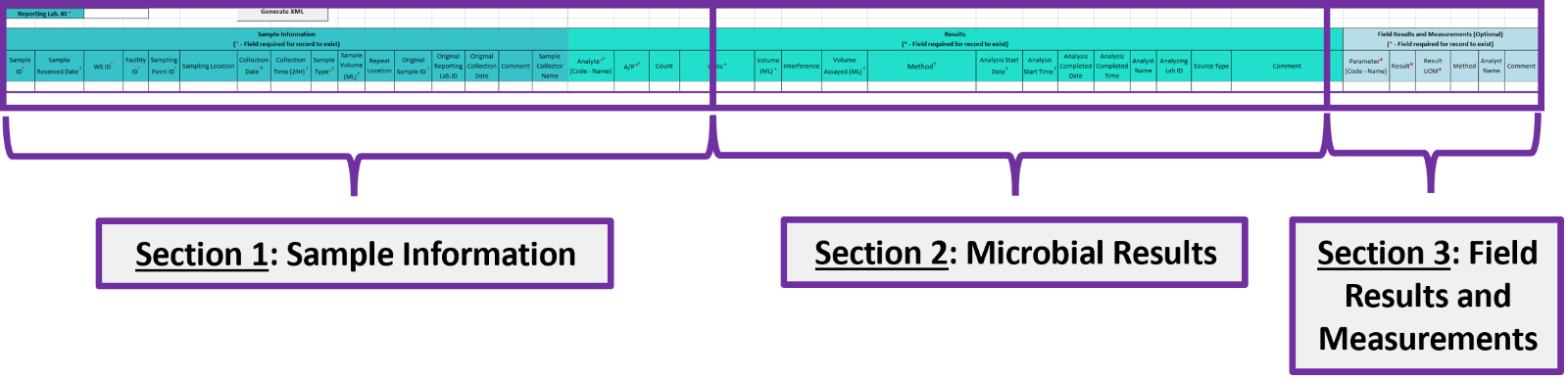
Section 1: Sample Information
- Reporting Lab. ID*: Lab identification number.
- Sample ID*: Lab sample identification number, limit to 20 characters (numbers, letters, dash/underscore are allowed).
- Sample Received Date*: Date sample was received by lab (MM/DD/YY).
- WS ID*: Public Water System identification number (PWSID).
- NOTE: Each water system name has a unique PWSID number. If the name and number on the work order does not match what is listed in CMDP, investigate to ensure accuracy and consistency.
- Facility*: Select the appropriate water system facility from where the sample was collected. The source facility for a surface water (SW) system is called an intake and the facility code will start with an “IN”. If the PWS has multiple intakes be sure to select the correct one associated with the sample. Meanwhile, the source facility for a ground water under the direct influence of surface water (GWUDI) system is called a well and the facility code will start with a “WL”.
- Sampling Point*: Select the appropriate sample point related to the intake (SW) or well (GWUDI) facility where the sample was collected.
- If you are unsure of the Facility ID and Sample Point ID to enter, review the How to Find PWS Facility ID/Sample Point ID information page.
- Sampling Location*: This field must describe the location where the sample was taken (i.e., raw water). Keep description succinct (numbers, letters, dash/underscore only). Add “LT2” to the beginning of the sample location listed on the lab chain of custody (COC) if the system does not include it.
- Collection Date*: Date sample collected (MM/DD/YY).
- Collection Time (24H)*: Time sample collected (HH:MM).
- Sample Type*: From the drop down menu, select the Routine sample type.
- Sample Volume*: Volume of sample analyzed (numerical value only).
- Repeat Location: Not applicable for this sample type.
- Original Sample ID: Not applicable for this sample type.
- Original Reporting Lab. ID: Not applicable for this sample type.
- Original Collection Date: Not applicable for this sample type.
- Comment: Not required, however if comments are provided, please limit characters to numbers, letters, dash or underscore. In particular, do NOT include quotation marks.
- Sample Collector Name: Name of sample collector, report if information is provided.
Section 2: Microbial Results
- Analyte [Code-Name]*: From the drop down menu, select 3014 E.coli.
- A/P*: From the drop down menu, select whether the contaminant was Present or Absent in the analyzed sample.
- If No E.coli found in sample, report the sample as Absent. NOTE: If absent, a Comment is required with the sample result. Refer to the Comments field (at the bottom of this section) for further details.
- If Any E.coli found in sample, report the sample as Present and record the result under the Count field.
- Count**:
- If the result is Absent, do NOT enter data into this field.
- If the result is Present, enter the count of E.coli
- Units**: From the drop down menu, select either Most probable Number or Colonies for the sample result as appropriate.
- If the result is Absent, do NOT enter data into this field.
- if the result is Present, select the appropriate units of measure for the sample result.
- Volume (ML)**: If the result is Present, enter volume of sample.
- Interference: Not required but report if applicable.
- Volume Assayed*: Volume of sample analyzed (numerical value only).
- Method*: This drop-down menu includes ALL microbial analyses methods and is not filtered by the analytes your lab (or subcontracting lab) is certified for. Be sure to verify certification status and select the appropriate method. If the method is reported incorrectly, it will be rejected from the state database. If you are unsure which method should be reports, please see the Methods Chart to determine correct reporting. NOTE: Methods that only report a Presence/Absence result are NOT approved for LT2 samples.
- Analysis Start Date*: Date sample was placed in the incubator and lab began analysis (MM/DD/YY).
- Analysis Start Time*: Time sample was placed in the incubator and when lab began analysis (HH:MM).
- Analysis Completed Date: Not required but report if information is available (MM/DD/YY).
- Analysis Completed Time: Not required but report if information is available (HH:MM).
- Analyst Name: Not required but report if information is available.
- Analyzing Lab ID**: If the sample was subcontracted to a different lab for analysis, the analyzing lab identification number is required to be reported here.
- Comment**: For samples where E.coli is NOT present, submit the method detection limit (MDL) for the analysis through this field. Please limit characters to numbers, letters, dash or underscore. In particular, do NOT include quotation marks. NOTE: Do NOT use the less than (<) symbol in the comment field. Example: MDL is less than 1 E.coli/100 mL.
Section 3: Field Results and Measurements
REMINDER! This section should NOT be used for LT2 E.coli sample submittals. Please leave fields blank.
Section 4: Examples of Completed Sample Submission
Excel Examples Document - This document includes several examples as follows:
- Tab 1 - LT2 Sample EC Absent
- Tab 2 - LT2 Sample EC Present
 Indicates an external site.